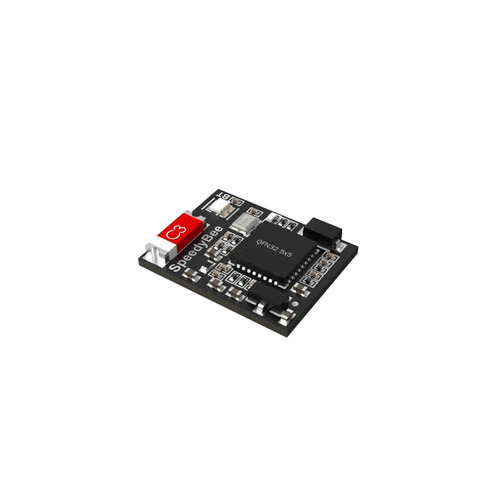
Supports. It will be turned on automatically only when upgrading the firmware of the module itself.
Communication Port
UART
Baudrate
115200
Bluetooth Automatically Turns Off
Enabled by default, the module will automatically detect the armed/ disarmed status of the FC. During the flight of the drone, the Bluetooth function will be disabled to prevent other wireless devices from being interfered by the Bluetooth signal.
BT Switch Pad
The Bluetooth function will be disabled when it receives a Low signal.In the BT Switch section of the manual, you can learn about the detailed instructions
Power Indicator
Solid Red: Indicates that the module is powered.
Working Status Indicator
Flashing white: Indicates that the UART communication with FC is abnormal, please check whether the wiring and settings are correct.
Solid White: Indicates that the communication with FC is normal, you can use the App for wireless parameter adjustment
Flashing green: Indicates that the wireless signal is being connected
Solid Green: Indicates that the connection with the App has been successful
Size
14*11*0.8mm
Weight
5g
배송안내
알씨뱅크는 빠르고 안전한 한진택배를 이용합니다.
총 결제금액이 50,000원 이상인 경우 무료배송으로 발송됩니다. (항공합판, 비행기 등 부피가 큰 상품들은 추가 배송비가 발생합니다.)
기본 배송비는 3,500원 입니다. (택배사가 지정한 도서,산간,오지 일부지역은 배송비가 추가됩니다)
조립이 필요한 상품의 경우 일반 상품보다 배송이 다소 늦어질 수 있습니다. (자세한 배송일정은 고객센터로 문의하시기 바랍니다.)
구매대행 또는 예약상품의 경우 해외 배송기간이 추가되며 기간은 상품 및 시기에 따라 차이가 있을 수 있습니다.
구매대행 또는 예약상품과 같이 구매한 경우 모든 상품들이 준비된 후 일괄 발송됩니다.
국내 재고 상품의 평균 배송일은 입금 확인 후 1~3일입니다. (택배사 사정에 따라 1~2일 지연될 수 있습니다.)
출고 마감 시각은 상품마다 다릅니다. 위쪽 재고 상자의 「오늘 00:00 까지 결제하시면 … 출고됩니다」 안내를 확인해 주세요. (주문 수량에 따라 달라질 수 있습니다.)
토요일에도 택배를 받아보실 수 있습니다. (일부 지역에 따라 차이가 있을 수 있습니다)
토, 일요일 및 공휴일은 택배 발송을 하지 않습니다.
교환 및 반품안내
단순 변심 또는 주문 실수로 인한 상품 청약철회 가능기간은 상품 수령일로 부터 7일 이내 입니다.
상품 개봉후 사용하여 상품 가치 훼손 시에는 7일 이내라도 교환 및 반품이 불가능합니다.
배터리류는 소모품으로, 제품 박스(포장)를 개봉하면 상품 가치가 현저히 떨어지므로 교환 및 반품이 불가능합니다(제품 하자·오배송 제외).
단순 변심 또는 주문 실수로 인한 교환, 반품은 고객께서 왕복 배송비를 부담하셔야 합니다(제품의 하자, 오배송 제외)
상품 파손 및 하자에 의한 교환 또는 반품의 배송비는 알씨뱅크에서 부담합니다.
제품을 수령하신 후 7일 초과시에는 제품 불량시 초기 불량으로 처리되지 않으며, 제품에 따라 유상 수리 처리됩니다.
조립이 필요한 상품의 경우 조립 및 사용의 흔적이 있는 경우 교환 및 환불이 불가능합니다.